Progress Tracking
The Progress tab gives you a comprehensive view of how each student is progressing through their curricula, with visual charts, streaks, heatmaps, and detailed statistics.
Current vs. Past Progress
Toggle between Current Progress and Past Progress at the top of the screen:
- Current Progress — Shows active curricula and their completion status
- Past Progress — Shows completed or archived curricula with historical data
Progress Overview
Each curriculum shows a pie chart displaying:
- Completed lessons — Shown in the curriculum's color
- Remaining lessons — Shown in gray
- Percentage complete — Displayed in the center
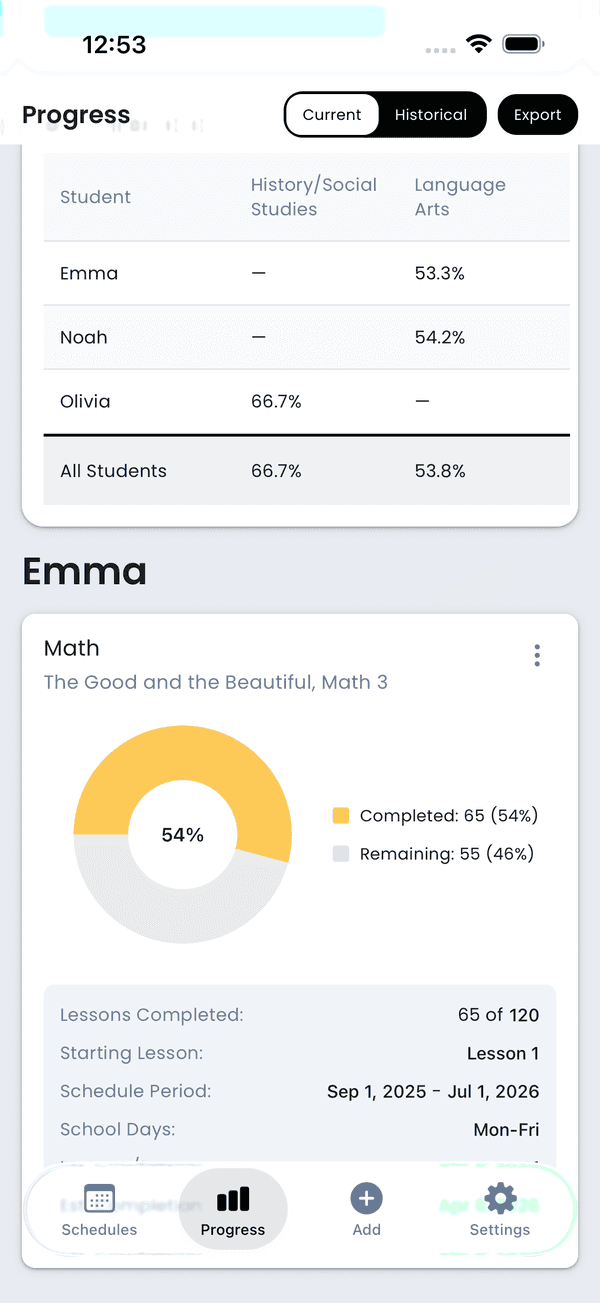
Progress pie chart
Per-Schedule Metrics
Below each chart, you'll find detailed statistics:
- School Days — The selected weekdays for the schedule, plus the cadence for multi-week schedules (for example,
M, W, F · Every 3 weeks) - Lessons Completed — X of Y total lessons
- Time Spent — Total hours and minutes tracked via lesson timers
- Schedule Period — Start and end dates
- Estimated Completion — Projected finish date based on current pace
- Days Ahead/Behind — How the student is pacing compared to the planned end date (see below)
- Same-Day Completion Rate — Percentage of lessons completed on their scheduled day
- Skip Count — Number of lessons that have been skipped
Days Ahead / Behind
This metric answers: "At the current pace, will this schedule finish on time?"
How It's Calculated
For each schedule, the app:
- Counts how many lessons remain
- Based on the lessons-per-day and days-per-lesson pacing settings, calculates how many school days are needed to finish
- Projects forward from today through school days (skipping weekends, holidays, and breaks) to find the estimated completion date
- Compares the estimated completion date to the planned end date of the schedule
If the estimated date is before the planned end date, the student is ahead. If it's after, they're behind.
Multiple Subjects
When a student has multiple schedules (e.g., Math, English, Science), the progress view shows the worst case across all active schedules. If Math is 2 days ahead but Science is 5 days behind, the student shows as 5 days behind — because that's the schedule that needs attention.
Example
A student has a Math schedule:
- 180 total lessons, 120 completed, 60 remaining
- Pacing: 1 lesson per day, school days Mon–Fri
- Planned end date: May 15
The app counts forward 60 school days from today (skipping weekends and any configured holidays or breaks). If that lands on May 10, the student is 5 days ahead. If it lands on May 22, they're 7 days behind.
Tip: If a student is falling behind, you can adjust the pacing options to increase lessons per day and get back on track.
Streaks
Track consistency with streak metrics:
- Lesson Streak — Consecutive days where all scheduled lessons were completed. Days with no lessons scheduled are skipped (they don't break the streak). The best streak is also shown for comparison.
- Task Streak — Consecutive days where all extra work tasks were completed. Only counts non-school tasks (school-related tasks count toward the lesson streak instead).
- Gold Streak — Consecutive days where everything due was completed — lessons and tasks combined. This is the streak used for the weekly consistency bonus. Days with nothing due are skipped without breaking the streak.
- Weekly Pace — Number of lessons completed in the last 7 days (not a streak, just a count).
- Family Streak — When viewing multiple students, shows consecutive school days where every student completed at least one lesson. Only appears when you have 2 or more students.
For all streaks, today's incomplete work doesn't break the streak — the day isn't over yet. Once today's work is finished, it gets added to the streak.
Activity Heatmap
The activity heatmap shows your day-of-week completion patterns over time, similar to a GitHub contribution graph. Darker colors indicate more lessons completed on that day. This helps you identify:
- Which days of the week are most productive
- Patterns in completion over weeks and months
- Gaps or breaks in activity
Filtering
Filter the progress view by:
- Date Range — 7 days, 30 days, or all time
- Student — View progress for a specific student
- Subject — Focus on a particular subject area
Related Features
- Completion Bonuses & Streaks — Earn bonus coins for consistent completion
- Grading & Evaluations — Add grades and evaluations to curricula
- Progress Reports — Export detailed reports for your records